Version: 最新

Execute Scrape Task

Scrape task is the second step in the scraping process. It is used to scrape scan result files according to scraping rules, obtain movie metadata, generate final movie files, and complete movie organization work.

Prerequisites

Before executing a scrape task, please ensure the following conditions are met:

Network Connection

Organizing files requires obtaining movie metadata through the internet, so you need to ensure the project can normally access the internet.

Metadata Plugins

Please confirm that relevant metadata plugins are enabled and correctly configured. These plugins are the key to obtaining movie metadata:

Important Reminder

Without enabling relevant metadata plugins, you will not be able to obtain movie metadata, which will cause scraping to fail.

Data Source Declaration

This software does not provide any source data. All movie metadata comes from user-configured plugin services.

Execute Scrape Task

Step 1: Enter the Scrape Storage Page

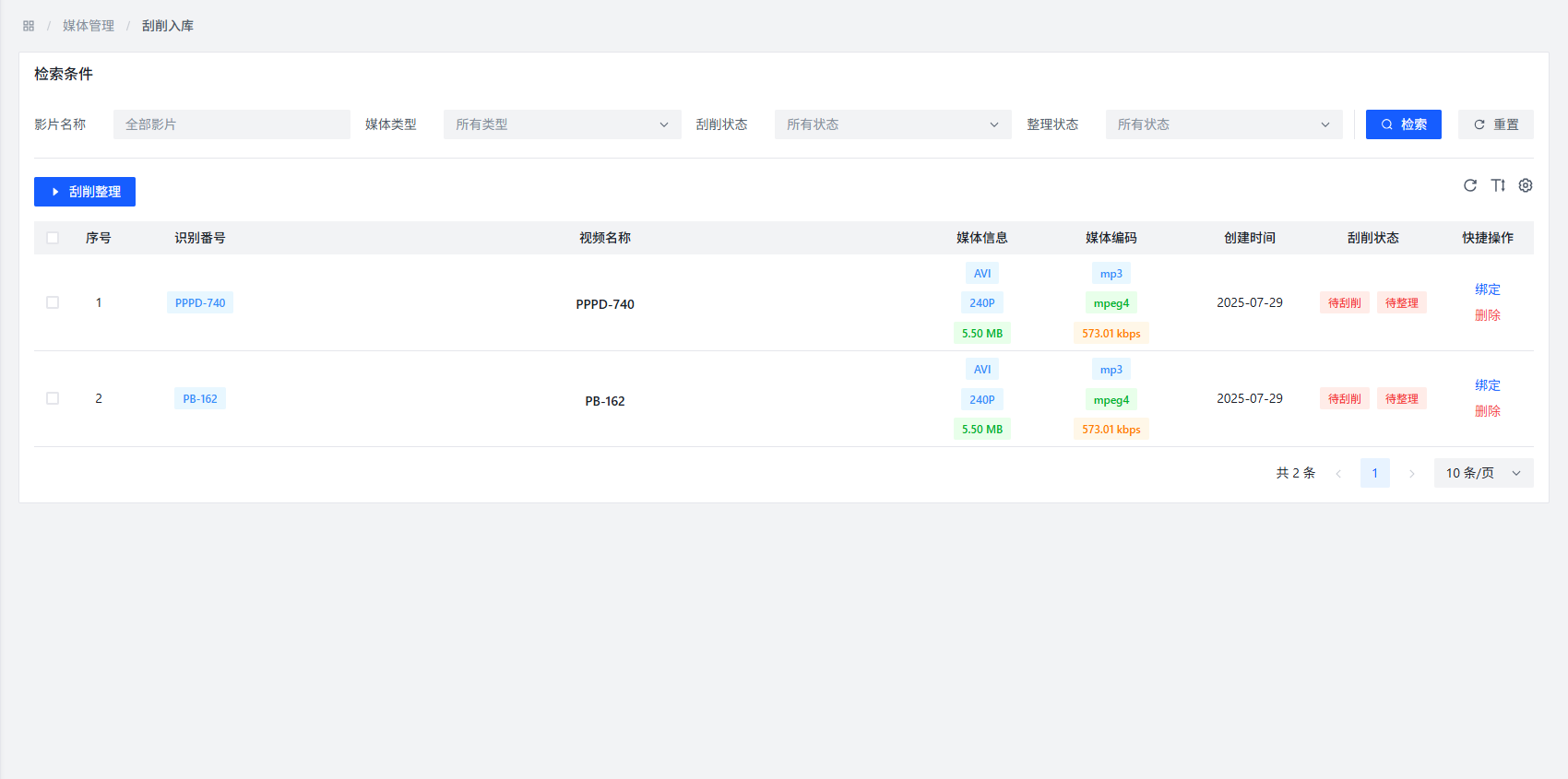
Access Task Management through the left navigation bar, then select the Scrape Storage option to enter the scrape storage page.

Scrape Storage Page

Step 2: Select Files to Scrape

On the scrape storage page, you can see a list of all files to be scraped recorded through scan tasks. Check the files you want to scrape as needed.

Step 3: Start Executing Scrape Task

Click the Scrape and Organize button on the page, and the system will start executing the scrape task.

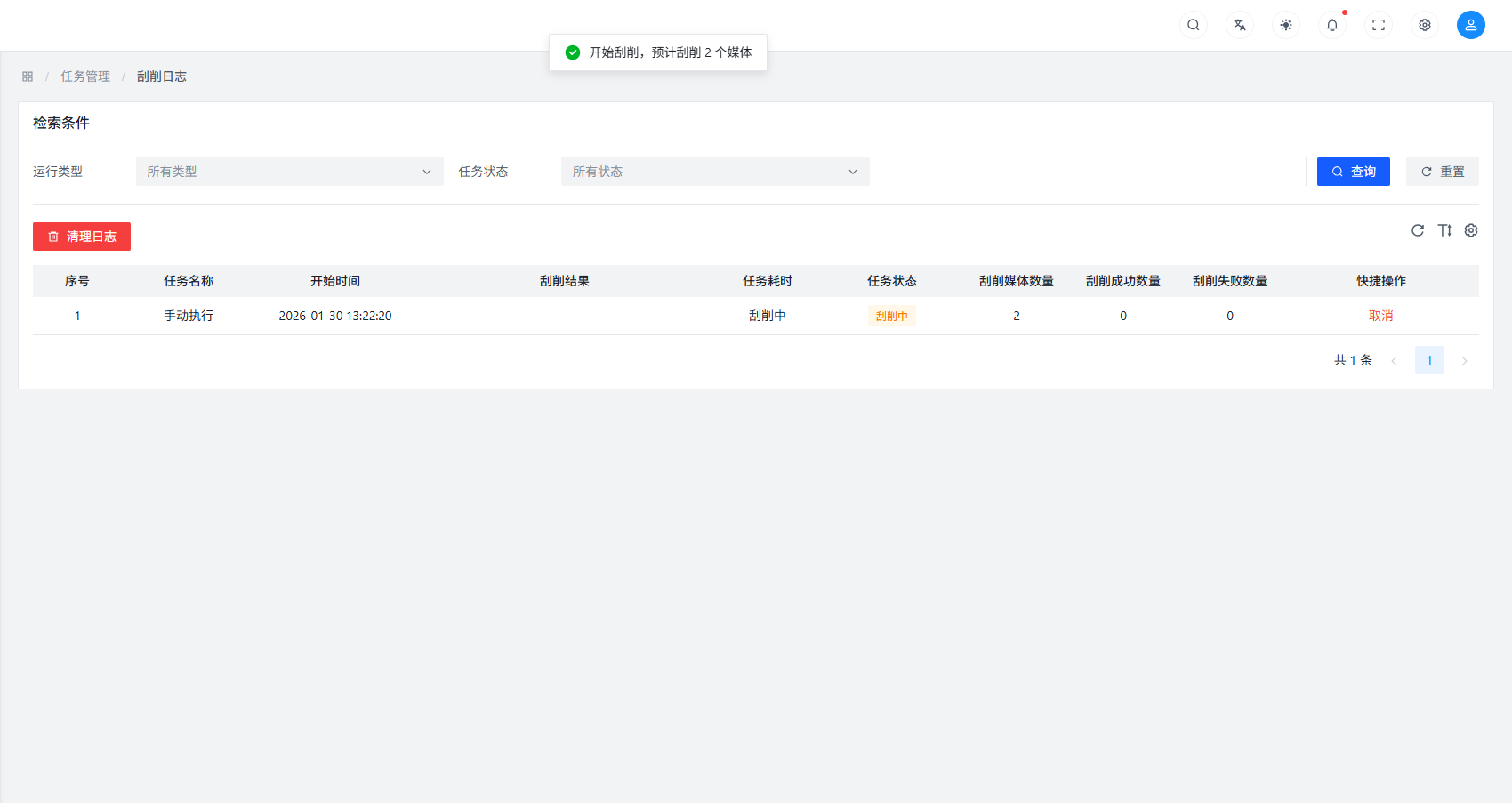
Execute Scrape Task

Step 4: View Task Execution Status

During task execution, the page will display the execution status of the scrape task in real-time, including:

  • Number of successfully scraped files
  • Number of failed scraped files
  • Number of skipped files

Step 5: Terminate Scrape Task (if needed)

During execution, if you need to terminate the scrape task, you can click the Cancel button at any time to stop task execution.

Scrape Principle Explanation

The working principle of scrape task is as follows:

  1. Read Scrape Rules: The system determines how to handle different types of files based on the scrape rules you configured
  2. Match Metadata: Through enabled metadata plugins, try to match and obtain detailed information about movies
  3. Generate Movie Files: Based on the obtained metadata, the system generates standardized movie files
  4. Organize File Structure: Organize movie files according to preset naming rules and directory structure

Common Problems and Solutions

Problem: Scraping Failed

Possible Causes:

  • Network connection issues
  • Metadata plugins not enabled or configured incorrectly
  • Inappropriate scrape rule settings
  • File naming does not match matching rules

Solutions:

  • Check if network connection is normal
  • Confirm that metadata plugins are enabled and correctly configured
  • Check if scrape rule settings are reasonable
  • Try modifying file naming format to better match matching rules

Problem: Incomplete Metadata Acquisition

Possible Causes:

  • Plugin service temporarily unavailable
  • Movie information does not exist in plugin service
  • Network delay causes acquisition timeout

Solutions:

  • Try again later, the plugin service may be temporarily unavailable
  • Try using other metadata plugins
  • Check network connection stability

Best Practices

  1. Batch Processing: For large numbers of files, it is recommended to scrape in batches to avoid excessive system load
  2. Priority Configuration: Before executing scraping, ensure scrape rules and metadata plugins are correctly configured
  3. Regular Updates: Regularly update metadata plugins to obtain better matching results
  4. Check Logs: When scraping fails, check system logs to obtain detailed error information

Notes

Note

Scrape tasks may take a long time to complete, depending on the number of files and network speed. Please be patient.

Tip

For optimal scraping results, it is recommended to ensure file naming is as standardized as possible, including necessary identification information (such as numbers, titles, etc.).