Scrape Configuration
Scrape configuration is used to set how the system obtains movie metadata from the network, how to organize file directory structure, and other scrape-related parameters before task execution, ensuring the scrape process can efficiently and accurately obtain and organize movie resources.
Access Scrape Configuration
You can access the scrape rule configuration page through the following path:
Task Management >> Scrape Rule Configuration
:::info Operation Tip After updating the configuration, please remember to click the Save button, otherwise the configuration will not take effect. :::
Configuration Interface
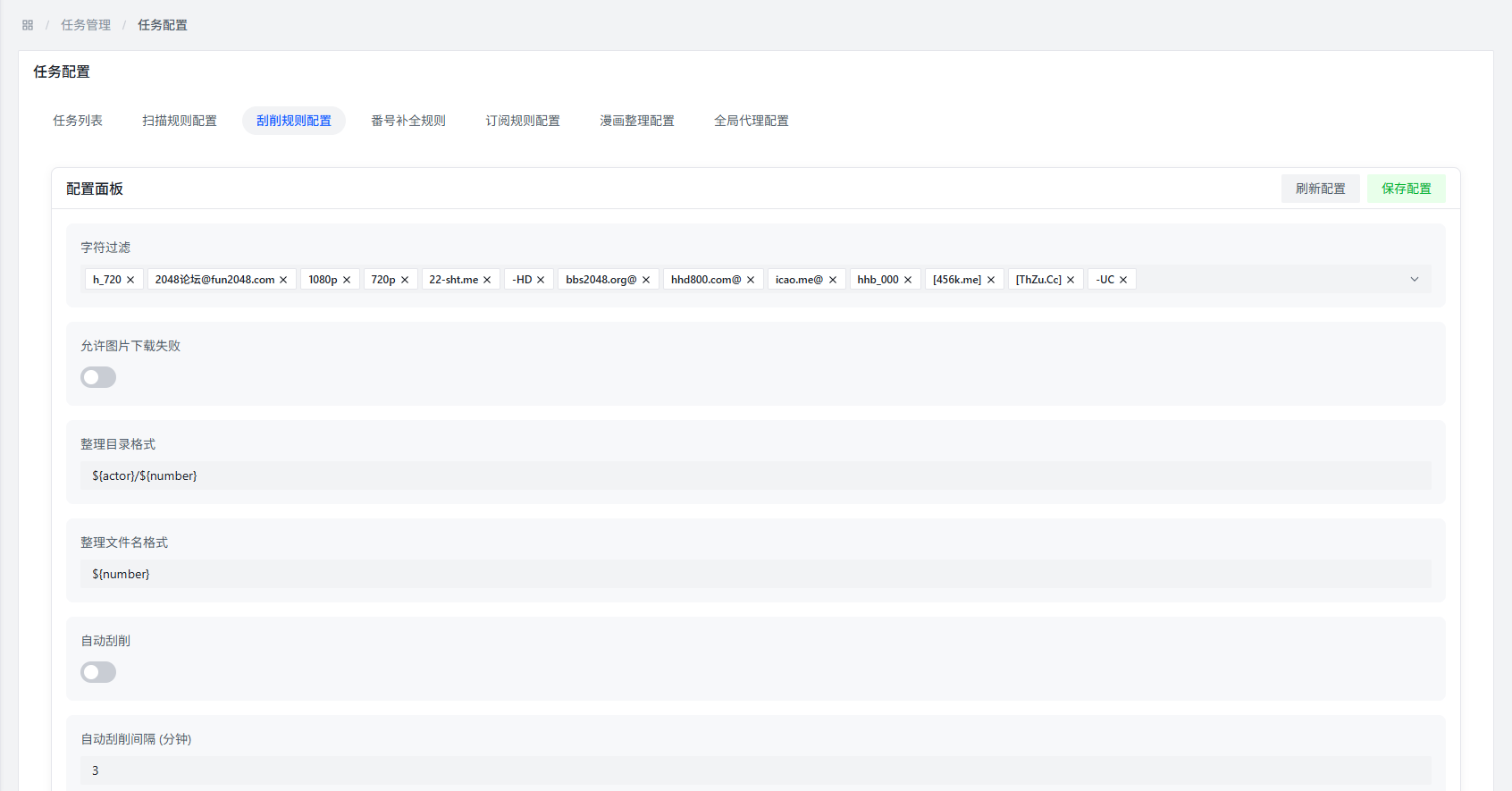
Basic Configuration
Character Filtering
Function Description: Filter file names during scraping to remove unnecessary characters in advance, improving the recognition rate of numbers.
Role: By removing interfering characters from file names, the system can more accurately identify movie numbers, thereby obtaining more accurate metadata.
Allow Image Download Failure
Function Description: Set whether to continue executing the scrape task when image download fails.
Role: After enabling this option, even if image download fails, it will not affect the acquisition of scrape results, improving the success rate of scraping.
Organization Directory Format
Function Description: Set the organizational structure of directories after scraping is completed.
Configuration Method: Customize the directory format by combining variables provided by the system.
Example: ${actor}/${number} will create a structure with actor name as the first-level directory and movie number as the second-level directory.
Organization File Name Format
Function Description: Set the naming format of video files after scraping is completed.
Configuration Method: Customize the file name format by combining variables provided by the system.
Example: ${title_safe}.${ext} will use the safe movie title as the file name and retain the original file extension.
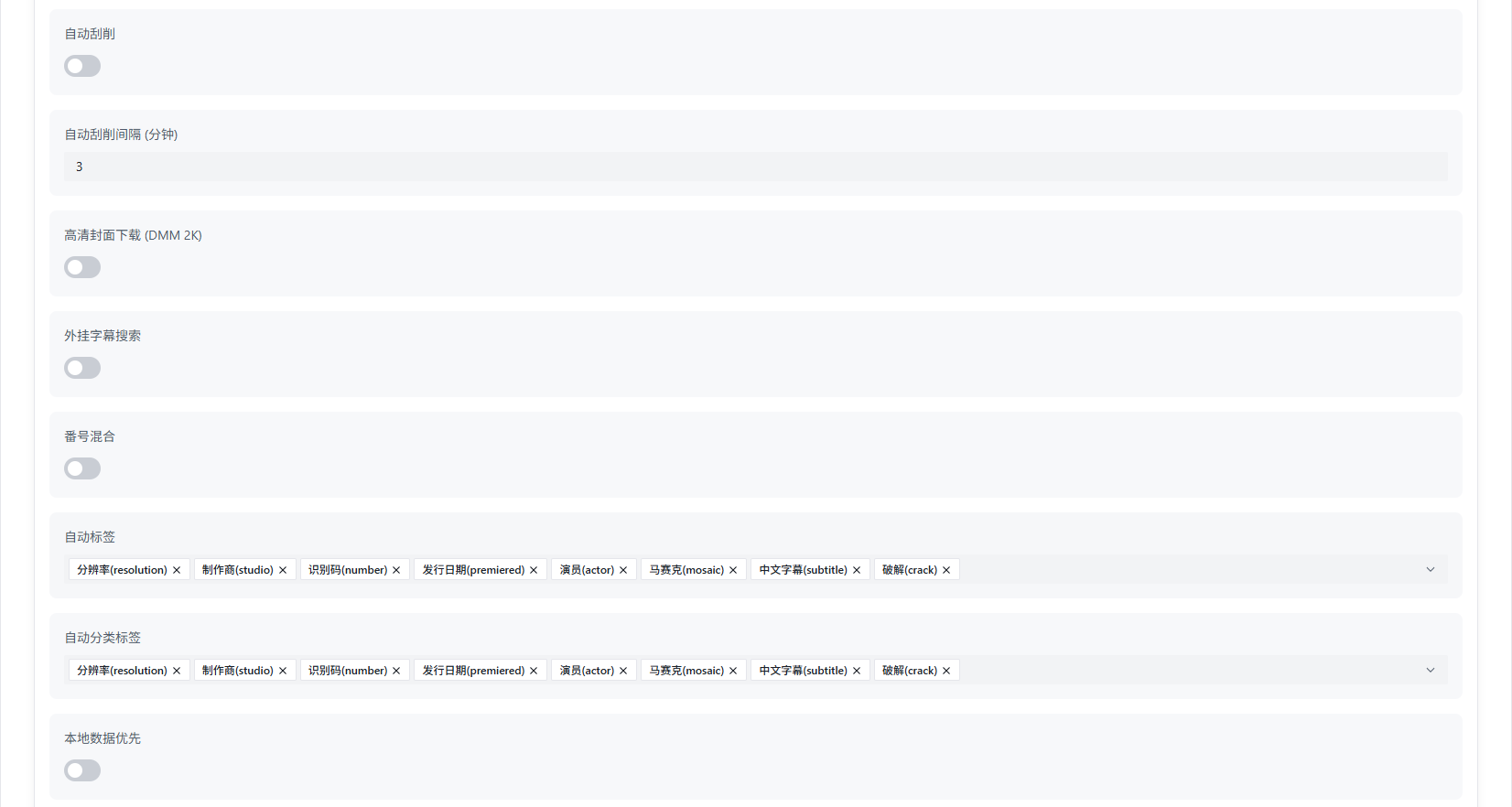
Auto Scrape
Function Description: Set whether to automatically trigger scrape tasks after scan tasks are completed.
Default Behavior: By default, you need to manually select scanned files to execute scrape tasks.
Enable Effect: After enabling, the system will automatically discover scrapable movie files and execute scraping according to configured rules.
Auto Scrape Interval
Function Description: Set the execution interval of auto scrape tasks.
Unit: Minutes
Default Value: 3 minutes (when auto scrape is enabled)
HD Cover Download
Function Description: Set whether to download HD covers for movies.
Download Source: After enabling, the system will try to obtain HD covers from Fanza DMM; if not available, it will try to obtain from other sources.
External Subtitle Search
Function Description: Set whether to search for and download external subtitles (soft subtitles) for movies.
Storage Location: Downloaded subtitle files will be saved to the final scrape directory.
Number Mixing
Function Description: Set whether to add number prefixes to fields such as titles in the nfo files generated after scraping.
Auto Tags
Function Description: Set whether to add additional information to the tag tags in the nfo files generated after scraping.
Example: Add tags such as resolution, number, Chinese subtitles, uncensored, etc.
Auto Category Tags
Function Description: Set whether to add additional information to the genre tags in the nfo files generated after scraping.
Example: Add tags such as resolution, number, Chinese subtitles, uncensored, etc.
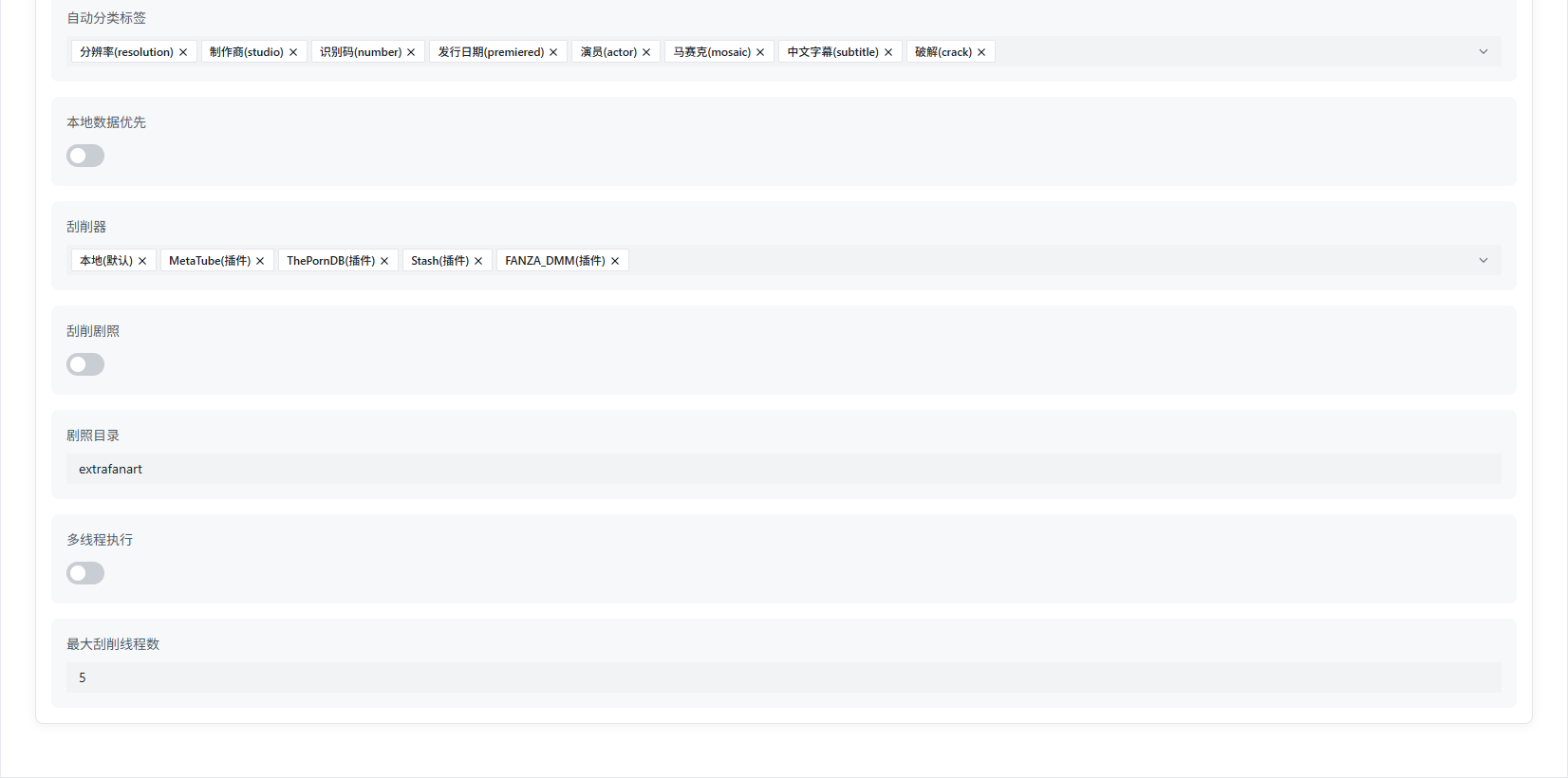
Local Data Priority
Function Description: Set whether to prioritize using local existing data during scraping.
Role: If local existing data meets scrape rules, it will directly use local data instead of downloading or updating data from the network, improving scrape efficiency.
Scraper
Function Description: Select the scraper used by the system.
Available Scrapers:
- Local: Use manually created movie information
- Metatube (plugin)
- ThePornDB (plugin)
- Stash (plugin)
- Fanza DMM (plugin)
Scrape Stills
Function Description: Set whether to download movie stills.
Storage Location: Downloaded still files will be saved to the specified directory.
Stills Directory
Function Description: Set the save directory for still files.
Default Value: Save to the extrafanart directory in the same directory as the video file.
Multi-threaded Execution
Function Description: Set whether to enable multi-threaded execution of scrape tasks.
Pros and Cons:
- Pros: Enabling will improve scrape efficiency
- Cons: Will increase system resource consumption
Suggestion: According to system resource conditions, reasonably configure multi-threaded execution. For example, if the system has 4 CPU cores, it is recommended to set 4 threads.
Maximum Thread Count
Function Description: Set the maximum number of threads during scraping.
Default Value: 5 threads
Suggestion: According to system resource conditions, reasonably configure the maximum thread count.
Directory and File Name Organization
In the configuration items, there are two options: Organization Directory Format and Organization File Name Format. You can customize the directory and file name formats by combining variables provided by the system.
Safe Variables
Role: Add _safe suffix after variable names to avoid problems caused by special characters in file names.
Example: ${actor_safe} If there are special characters in the actor name, they will be replaced with safe characters.
Role: Avoid special characters in movie titles causing directory levels to be interrupted, ensuring the integrity of the directory structure.
Organization Example
A complete video file will be organized as: ${actor}/${number}/${title_safe}.${ext}
Example:
- Actor Name: "John Doe"
- Movie Number: "ABC-123"
- Movie Title: "Sample Title"
- File Extension: "mkv"
Final Organized Path: John Doe/ABC-123/Sample Title.mkv
Organization Directory Variables
Default Configuration: ${actor}/${number}
Note: / will be recognized as a directory separator, which can create different directory levels.
| Variable Name | Safe Variable Name | Description | Example |
|---|---|---|---|
${actor} | ${actor_safe} | Actor name | "John Smith" |
${number} | ${number_safe} | Movie number | "ABC-123" |
${title} | ${title_safe} | Movie title | "Sample Title" |
${date} | ${date_safe} | Release date | "2024/01/01" |
${year} | ${year_safe} | Release year | "2024" |
${month} | ${month_safe} | Release month | "01" |
${day} | ${day_safe} | Release date | "01" |
${mosaic} | ${mosaic_safe} | Mosaic type | "Uncensored/Censored" |
${resolution} | ${resolution_safe} | Video resolution | "1080p" |
${director} | ${director_safe} | Director name | "Director Name" |
${studio} | ${studio_safe} | Studio name | "Studio Name" |
Default Values: All variables have default values, if not specified, default values will be used.
Organization File Name Variables
Default Configuration: ${number}
| Variable Name | Safe Variable Name | Description | Example |
|---|---|---|---|
${actor} | ${actor_safe} | Actor name | "John Smith" |
${number} | ${number_safe} | Movie number | "ABC-123" |
${title} | ${title_safe} | Movie title | "Sample Title" |
${date} | ${date_safe} | Release date | "2024/01/01" |
${year} | ${year_safe} | Release year | "2024" |
${month} | ${month_safe} | Release month | "01" |
${day} | ${day_safe} | Release date | "01" |
${mosaic} | ${mosaic_safe} | Mosaic type | "Uncensored/Censored" |
${resolution} | ${resolution_safe} | Video resolution | "1080p" |
${director} | ${director_safe} | Director name | "Director Name" |
${studio} | ${studio_safe} | Studio name | "Studio Name" |
Configuration Example
The following is a typical scrape configuration example:
| Configuration Item | Setting Value |
|---|---|
| Character Filtering | Enabled |
| Allow Image Download Failure | Enabled |
| Organization Directory Format | ${actor}/${number} |
| Organization File Name Format | ${title_safe}.${ext} |
| Auto Scrape | Enabled |
| Auto Scrape Interval | 5 minutes |
| HD Cover Download | Enabled |
| External Subtitle Search | Enabled |
| Number Mixing | Enabled |
| Auto Tags | Enabled |
| Auto Category Tags | Enabled |
| Local Data Priority | Enabled |
| Scraper | Metatube, Fanza DMM |
| Scrape Stills | Enabled |
| Stills Directory | extrafanart |
| Multi-threaded Execution | Enabled |
| Maximum Thread Count | 4 |
Common Questions
Q: Why does scraping fail?
A: Possible reasons include:
- Number recognition error
- Network connection issue
- Scraper cannot find matching metadata
- Configuration error
Q: How to improve scraping success rate?
A: You can try the following methods:
- Ensure the number in the file name is clearly recognizable
- Enable character filtering function
- Configure multiple scrapers
- Ensure network connection is normal
Q: What is the difference between auto scrape and manual scrape?
A:
- Auto Scrape: Automatically executed after scanning is completed, no manual intervention required, suitable for batch processing
- Manual Scrape: Requires manual selection of files to execute scraping, suitable for scenarios with high requirements for scrape results
Q: Why are downloaded subtitle files not matching video files?
A: Possible reasons include:
- Inaccurate number recognition during subtitle search
- Subtitle download failure due to network connection issues
- Subtitle file naming inconsistent with video file
Q: How to customize directory structure?
A: By combining variables provided by the system, for example:
${studio}/${actor}/${number}: Organize by studio 鈫?actor 鈫?number hierarchy${year}/${month}/${title_safe}: Organize by year 鈫?month 鈫?title hierarchy