Scrape Configuration
Scrape configuration tells the system how to find movie info online (posters, descriptions, cast, etc.) and how to organize the files afterward.
What's "scraping"? Scraping means the system automatically searches online for movie information — like title, poster, cast, description (collectively called "metadata") — and downloads it to go with your video files.
Access Scrape Configuration
You can find the scrape rule config page here:
Task Management >> Scrape Rule Configuration
:::info Tip Remember to click Save after changing the config, or it won't take effect. :::
Configuration Interface
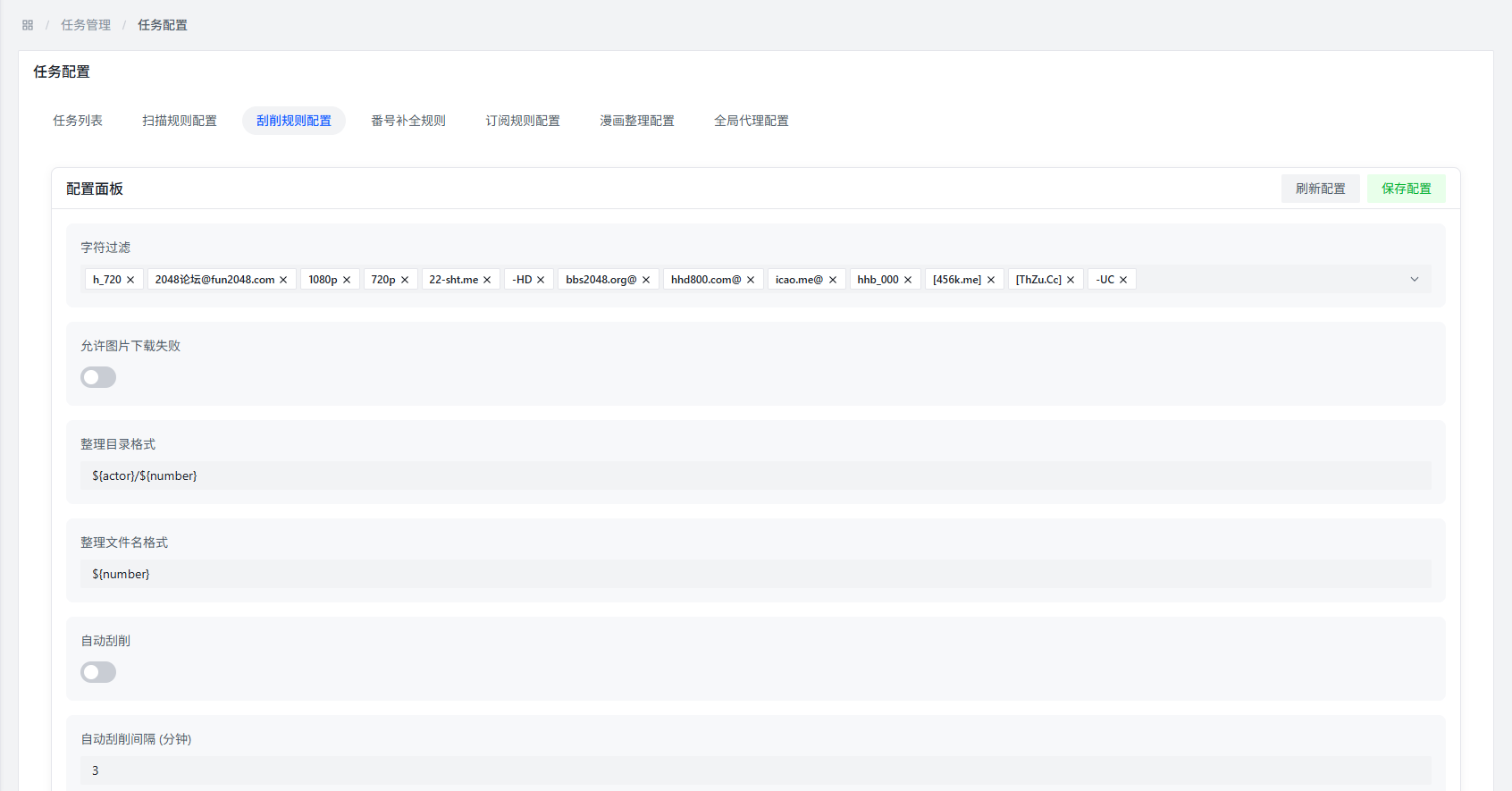
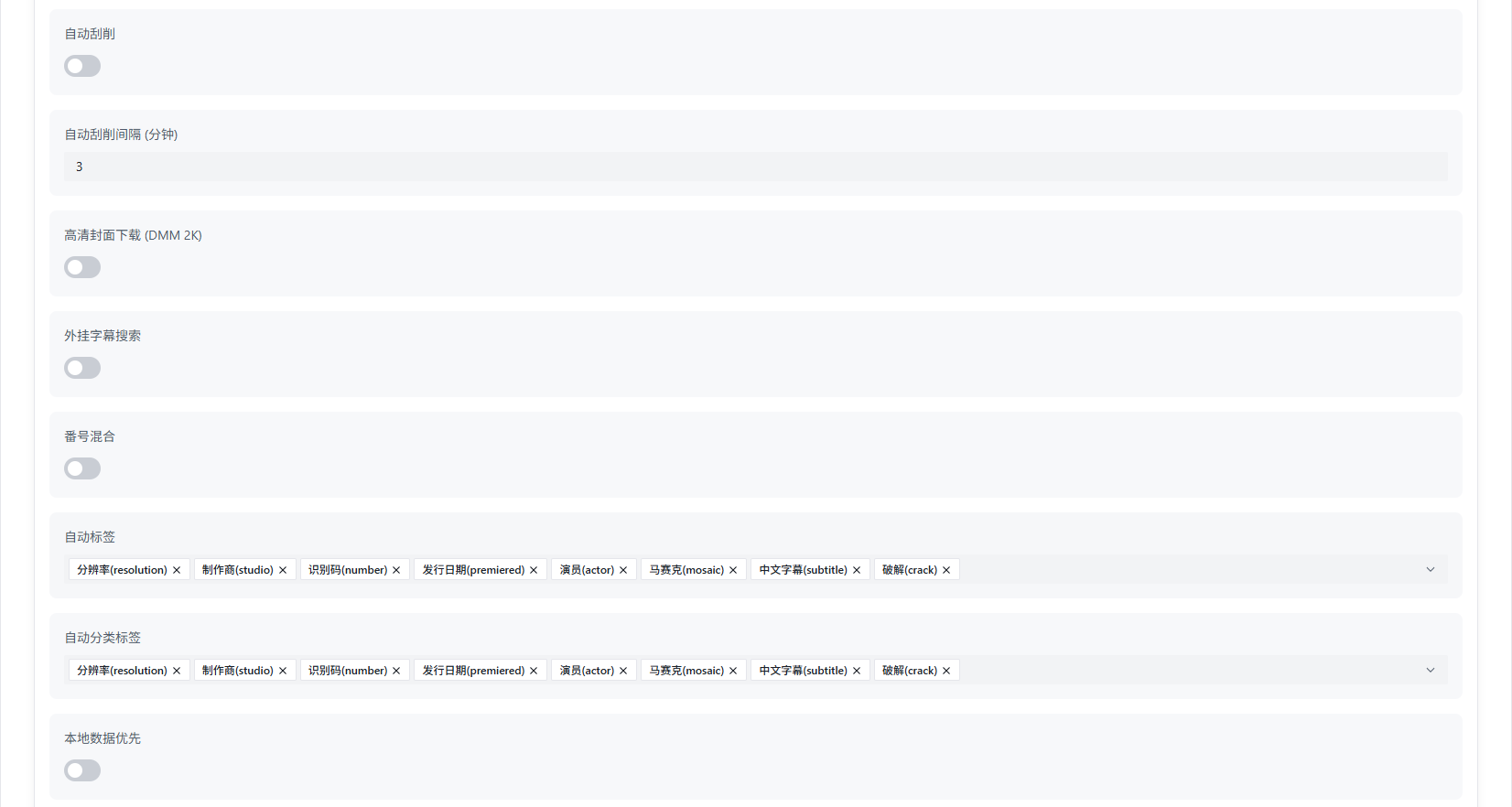
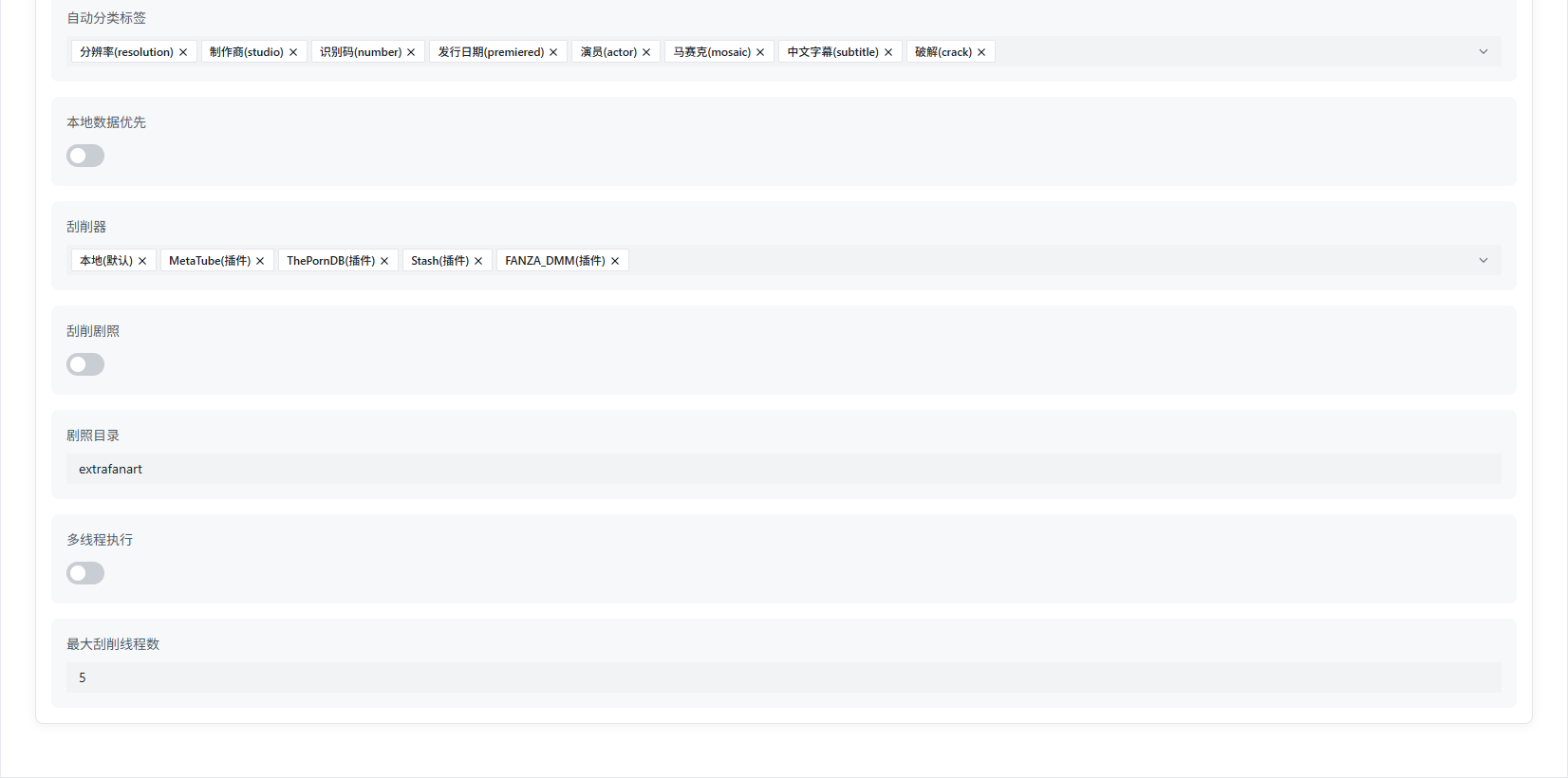
Basic Configuration
Character Filtering
What it does: Filter out messy characters from file names before scraping, improving recognition accuracy.
Why it matters: Removing distracting characters helps the system identify the video number more accurately, so it finds the right movie info.
Allow Image Download Failure
What it does: Even if image downloads fail, the scrape task keeps going.
Why it matters: With this on, a few failed images won't block the whole scraping process, improving overall success rate.
Organization Directory Format
What it does: Set how folders are organized after scraping.
How to configure: Combine the system's built-in variables to create your desired directory structure.
Example: ${actor}/${number} creates a two-level structure: "actor name/video number."
Organization File Name Format
What it does: Set how video files are named after scraping.
How to configure: Combine the system's built-in variables to create your desired file name format.
Example: ${title_safe}.${ext} uses a safe version of the movie title as the file name, keeping the original extension.
Auto Scrape
What it does: Whether to automatically start scraping after a scan finishes.
Default: You need to manually select files to scrape.
When enabled: The system will automatically find scrapable movie files and start working.
Auto Scrape Interval
What it does: How often auto-scrape runs.
Unit: Minutes
Default: 3 minutes (when auto-scrape is enabled)
HD Cover Download
What it does: Whether to download HD cover images for movies.
Download source: When enabled, it first tries Fanza DMM for HD covers; if not available, it looks elsewhere.
External Subtitle Search
What it does: Whether to search for and download external subtitles (soft subtitles).
Storage: Downloaded subtitles are saved in the final scrape directory.
Number Mixing
What it does: Whether to prepend the video number to fields like title in the generated nfo file.
Auto Tags
What it does: Whether to add extra info to the tag field in the generated nfo file.
Example: Tags like resolution, number, Chinese subtitles, uncensored, etc.
Auto Category Tags
What it does: Whether to add extra info to the genre field in the generated nfo file.
Example: Genre tags like resolution, number, Chinese subtitles, uncensored, etc.
Local Data Priority
What it does: Prioritize using locally available data instead of fetching from the internet.
Why it matters: If local data already meets the requirements, use it — no need to download, making scraping faster.
Scraper
What it does: Choose which data source to search for movie info.
Available options:
- Local: Use your own manually created movie info
- Metatube (plugin)
- ThePornDB (plugin)
- Stash (plugin)
- Fanza DMM (plugin)
Scrape Stills
What it does: Whether to download movie stills (screenshots, scene images).
Storage: Downloaded stills are saved to your specified directory.
Stills Directory
What it does: Set where still files are stored.
Default: An extrafanart folder in the same directory as the video file.
Multi-threaded Execution
What it does: Whether to use multiple threads for scraping (process multiple files simultaneously for speed).
Pros and Cons:
- Pros: Faster scraping
- Cons: More system resources used
Suggestion: Based on your hardware. For example, if your CPU has 4 cores, set it to 4 threads.
Maximum Thread Count
What it does: The maximum number of threads to use during scraping.
Default: 5 threads
Suggestion: Base this on your hardware — don't set it too high or your system may slow down.
Directory and File Name Organization
Two config options — Organization Directory Format and Organization File Name Format — let you customize how files and folders are structured using system variables.
Safe Variables
What it does: Adding _safe to a variable name prevents special characters from causing issues in file names.
Example: ${actor_safe} will replace special characters in actor names with safe alternatives.
Why it matters: Prevents special characters in movie titles from breaking directory structures.
Organization Example
A complete video file after organization: ${actor}/${number}/${title_safe}.${ext}
Example:
- Actor: "John Doe"
- Video Number: "ABC-123"
- Movie Title: "Sample Title"
- File Extension: "mkv"
Final path: John Doe/ABC-123/Sample Title.mkv
Organization Directory Variables
Default config: ${actor}/${number}
Note: / is treated as a separator, so you can create different directory levels.
| Variable | Safe Variable | Description | Example |
|---|---|---|---|
${actor} | ${actor_safe} | Actor name | "John Smith" |
${number} | ${number_safe} | Video number | "ABC-123" |
${title} | ${title_safe} | Movie title | "Sample Title" |
${date} | ${date_safe} | Release date | "2024/01/01" |
${year} | ${year_safe} | Release year | "2024" |
${month} | ${month_safe} | Release month | "01" |
${day} | ${day_safe} | Release day | "01" |
${mosaic} | ${mosaic_safe} | Mosaic type | "Uncensored/Censored" |
${resolution} | ${resolution_safe} | Video resolution | "1080p" |
${director} | ${director_safe} | Director name | "Director Name" |
${studio} | ${studio_safe} | Studio name | "Studio Name" |
Default values: All variables have defaults — if not specified, the default is used.
Organization File Name Variables
Default config: ${number}
| Variable | Safe Variable | Description | Example |
|---|---|---|---|
${actor} | ${actor_safe} | Actor name | "John Smith" |
${number} | ${number_safe} | Video number | "ABC-123" |
${title} | ${title_safe} | Movie title | "Sample Title" |
${date} | ${date_safe} | Release date | "2024/01/01" |
${year} | ${year_safe} | Release year | "2024" |
${month} | ${month_safe} | Release month | "01" |
${day} | ${day_safe} | Release day | "01" |
${mosaic} | ${mosaic_safe} | Mosaic type | "Uncensored/Censored" |
${resolution} | ${resolution_safe} | Video resolution | "1080p" |
${director} | ${director_safe} | Director name | "Director Name" |
${studio} | ${studio_safe} | Studio name | "Studio Name" |
Configuration Example
Here's a typical scrape config:
| Configuration Item | Setting Value |
|---|---|
| Character Filtering | Enabled |
| Allow Image Download Failure | Enabled |
| Organization Directory Format | ${actor}/${number} |
| Organization File Name Format | ${title_safe}.${ext} |
| Auto Scrape | Enabled |
| Auto Scrape Interval | 5 minutes |
| HD Cover Download | Enabled |
| External Subtitle Search | Enabled |
| Number Mixing | Enabled |
| Auto Tags | Enabled |
| Auto Category Tags | Enabled |
| Local Data Priority | Enabled |
| Scraper | Metatube, Fanza DMM |
| Scrape Stills | Enabled |
| Stills Directory | extrafanart |
| Multi-threaded Execution | Enabled |
| Maximum Thread Count | 4 |
FAQ
Q: Why does scraping fail?
A: Possible reasons:
- The video number was recognized incorrectly
- Network connection issues
- The scraper couldn't find matching info
- Configuration is wrong
Q: How can I improve scraping success rate?
A: Try these:
- Make sure the video number in the file name is clear
- Enable character filtering
- Configure multiple scrapers as backups
- Ensure the network connection is stable
Q: What's the difference between auto and manual scraping?
A:
- Auto Scrape: Starts automatically after scanning — no manual work needed, great for batch processing
- Manual Scrape: You pick files and scrape them yourself, good when you want fine-grained control
Q: Why don't downloaded subtitles match the video?
A: Possible reasons:
- The number was recognized incorrectly during subtitle search
- Network issues prevented the subtitle download
- The subtitle file name doesn't match the video file name
Q: How do I customize the directory structure?
A: Combine the system variables. For example:
${studio}/${actor}/${number}: Organize by "studio → actor → number"${year}/${month}/${title_safe}: Organize by "year → month → title"