Smart Translation
The Smart Translation plugin lets the AMMDS platform translate between multiple languages with decent accuracy. It uses both machine translation and AI translation, so whatever you need to translate, it's got you covered.
This plugin provides a system-level translation solution supporting multiple translation engines and AI models. You can pick the best translation method for your specific needs.
Plugin Configuration
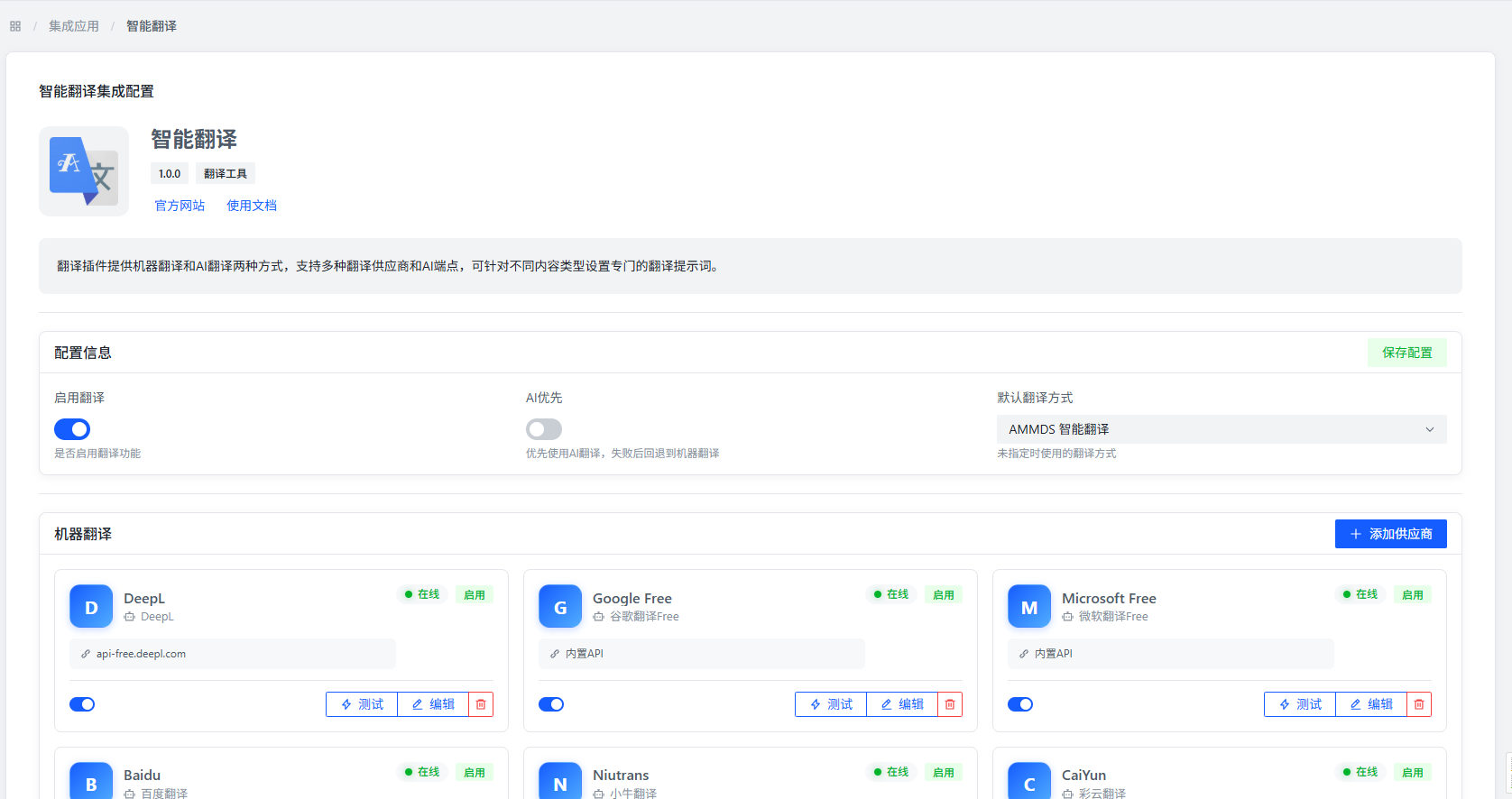
Basic Configuration Items
- Enable Translation: Controls whether to turn on the smart translation feature. When enabled, the system will handle translation requests based on your configuration.
- AI Priority: Whether to prioritize AI translation. If AI translation isn't available, the system will automatically fall back to machine translation — no interruption.
- Default Translation Method: The system defaults to MetaTube translation. You can also choose whether to enable smart translation.
Add Machine Translation
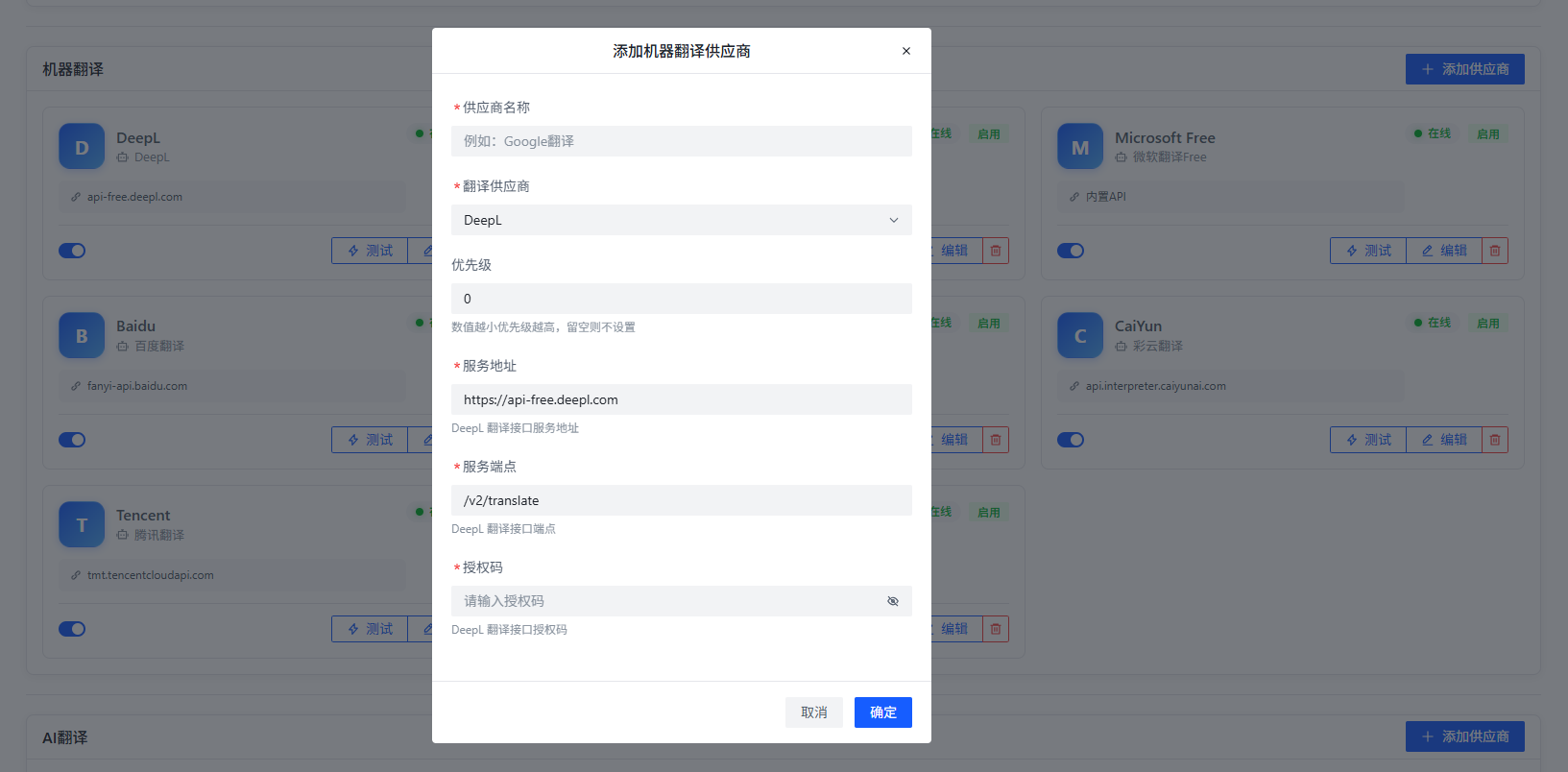
You can configure multiple machine translation services to form a translation cluster, making translation more reliable and diverse:
- Provider Name: Give the translation engine a name for easy management and identification.
- Translation Provider: Select a translation service provider, like Google Translate, Baidu Translate, Tencent Translate, etc.
- Priority: Set the order of translation engines. The system will use the highest priority one first; if it fails, it automatically moves to the next.
Note: After selecting different translation providers, the system will show the corresponding config fields. You'll need to fill in things like API keys.
Add AI Translation
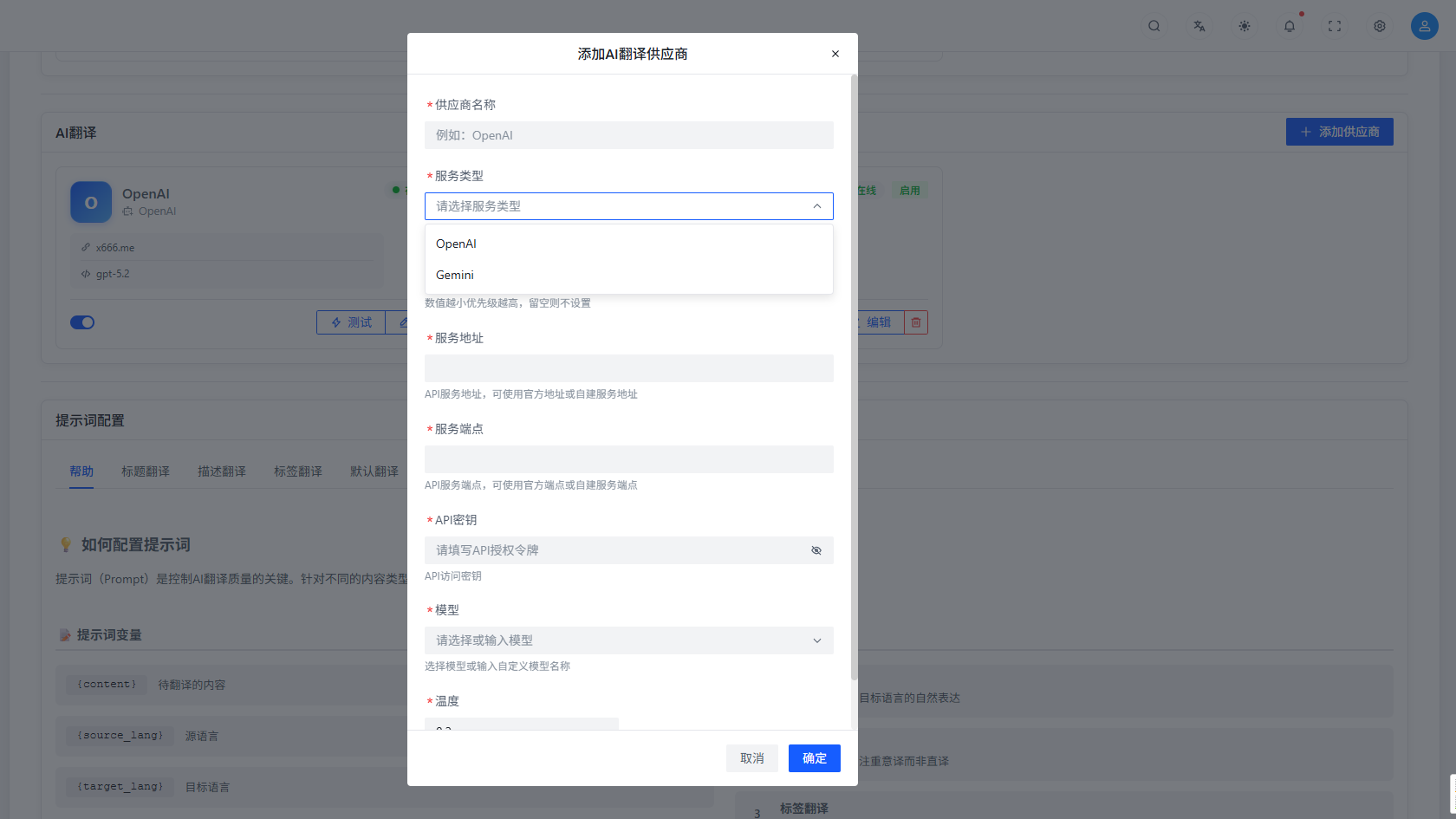
You can configure AI translation services using large language models for more natural and accurate results:
- Provider Name: Give the AI translation service a name for easy management.
- Service Type: Supports both OpenAI and Gemini endpoints — choose based on your situation.
- Service Address: Fill in the AI translation service's API address, either the official one or a self-hosted proxy.
- API Key: Fill in the key to access the AI translation service for secure calls.
- Model: Select the AI model to use. Different models vary in translation quality and speed.
- Temperature: Set the temperature parameter (between 0-1) to control the creativity of translations. Lower temperature = more conservative and accurate; higher temperature = more flexible and diverse.
Configure AI Translation Prompts
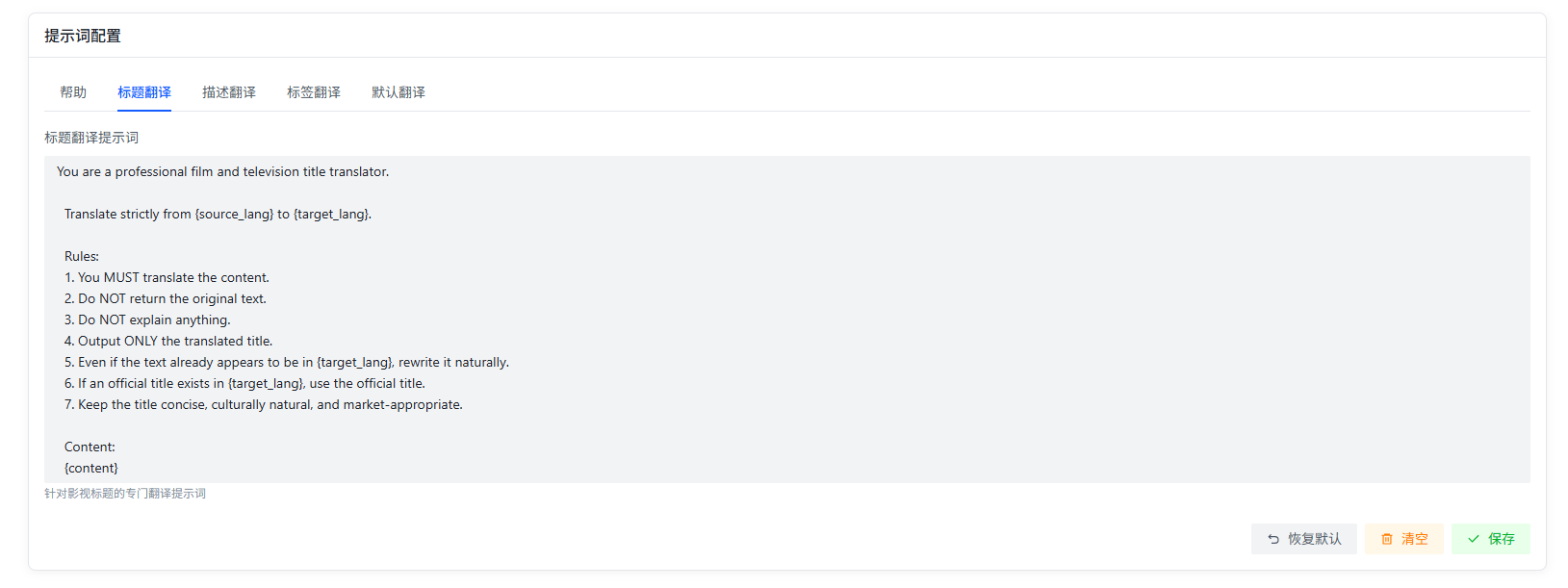
You can set up prompts for AI translation based on different scenarios to get better results:
- Prompt: Write instructions telling the AI how to translate. For example:
- Professional domain translation: "Please translate the following into a professional technical document style, keeping terminology accurate."
- Literary translation: "Please translate the following into a fluent literary style, preserving the original's emotion and feel."
- Business document translation: "Please translate the following into a formal business style, using professional terminology correctly."
Translation Testing
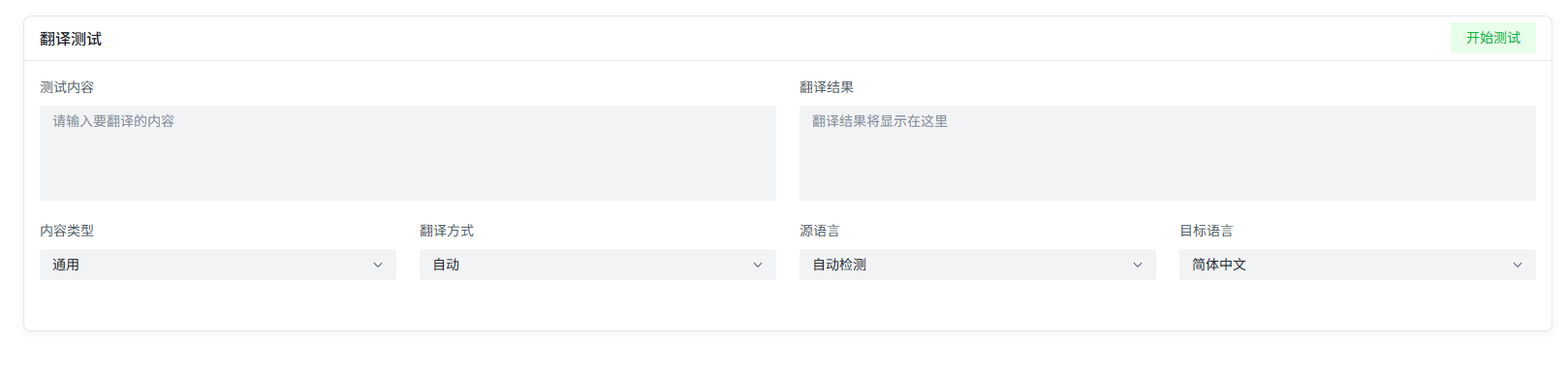
After configuration, you can input text in the test interface to see real-time translation results. The test feature supports:
- Multi-language translation testing
- Comparison testing across different translation engines
- Translation speed and quality evaluation
Supported Languages
The Smart Translation plugin supports multiple commonly used languages, including but not limited to:
- Chinese (Simplified/Traditional)
- English
- Japanese
- Korean
- French
- German
- Spanish
- Russian
- Arabic
The specific range depends on your configured translation service providers.
Use Cases
The Smart Translation plugin is great for:
- Multilingual Content Management: Provide translation support for AMMDS platform content, keeping things consistent across language versions.
- Internationalization: Help developers translate app interfaces and docs into multiple languages for a better global user experience.
- Cross-language Communication: Real-time translation in multilingual environments to break down language barriers.
- Professional Document Translation: Technical and business documents get professional translation with accurate terminology.
- Content Localization: Adapt content to specific languages and cultural contexts for better user acceptance.
Best Practices
- Mix Translation Services: Pick the right service based on content type. For content with lots of technical terms, use AI translation. For everyday content, machine translation is faster.
- Set Priorities Wisely: Put the most reliable translation services at higher priority for stable service.
- Optimize AI Prompts: Customize prompts for different translation scenarios to improve quality.
- Test Regularly: Periodically test configured translation services to make sure they're working and quality is good.
- Monitor Usage: Keep an eye on translation service usage to catch and fix issues early.
Troubleshooting
- Translation Service Unavailable: Check if the API key is correct, the network is working, and the provider isn't down.
- Poor Translation Quality: Adjust the AI temperature, optimize prompts, or try a different translation service.
- Slow Translation Speed: Check the network, reduce the text length per translation, or switch to a faster service.
- Inconsistent Results: Make sure you're using the same translation service and config — don't use different parameters in different scenarios.