Version: v1.6.48

Scan Configuration

Scan configuration is used to set how the system identifies and processes media files before task execution, ensuring the scanning process can accurately and efficiently identify your movie resources.

Access Scan Configuration

You can access the scan rule configuration page through the following path:

Task Management >> Scan Rule Configuration

Operation Tip

After updating the configuration, please remember to click the Save button, otherwise the configuration will not take effect.

Configuration Interface

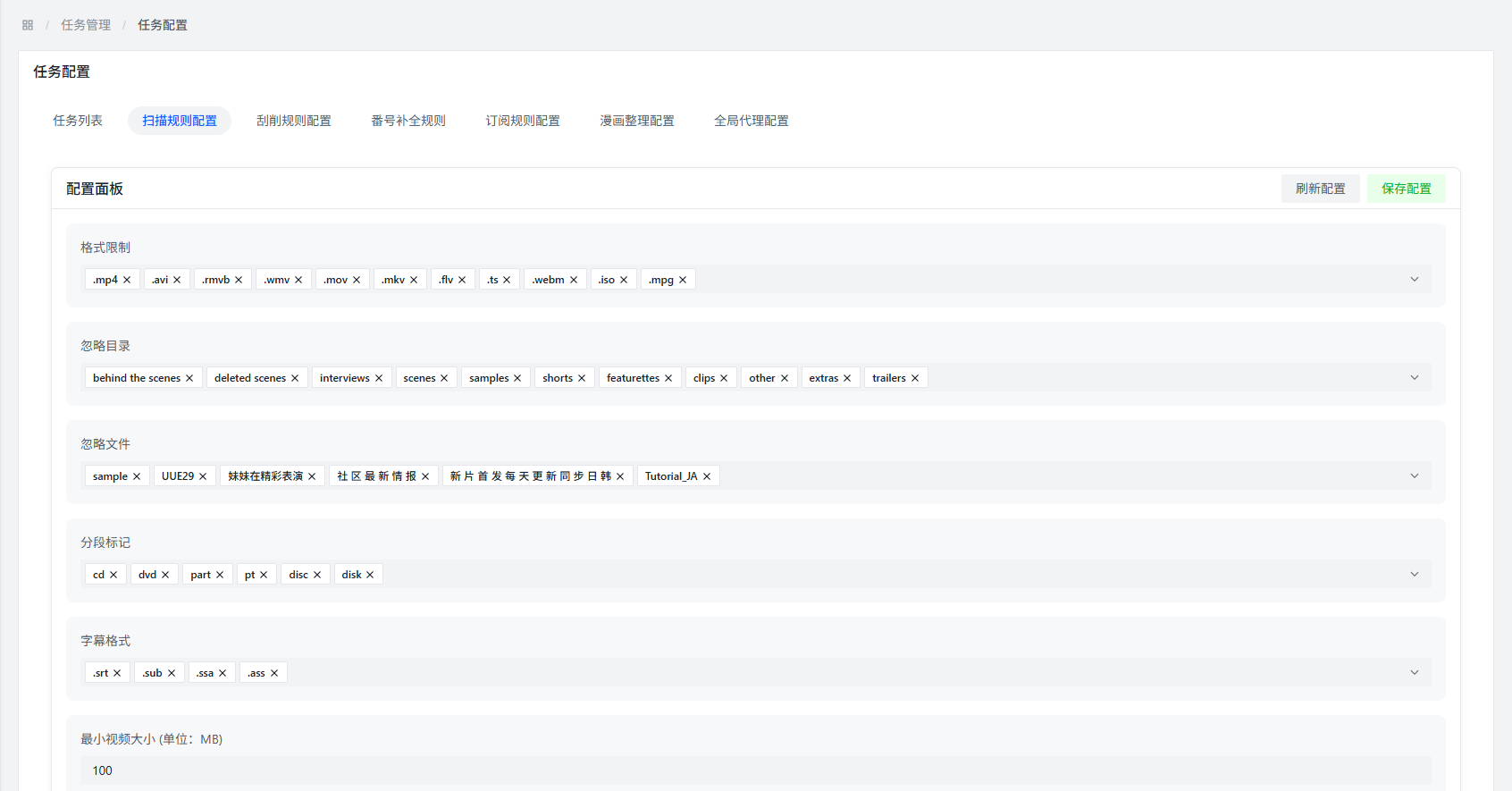
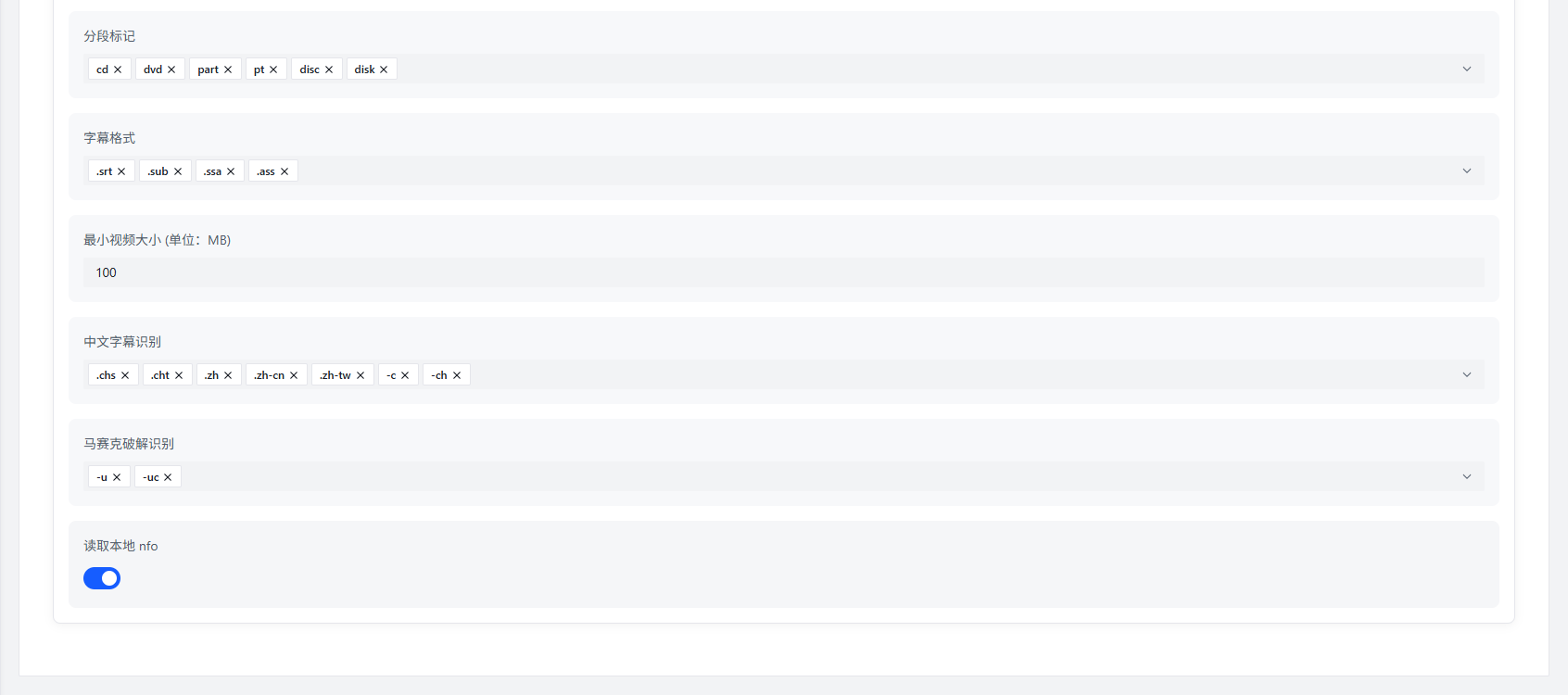
Scan Rule Configuration

Scan Rule Configuration

Configuration Item Description

Format Restrictions

Function Description: Set the media file types that the system can recognize.

Default Support: The system has built-in support for some common media file types, such as: .mp4, .mkv, .avi, .mov, etc.

Custom Addition: You can add other file types as needed. When adding, enter the file type extension (such as: .strm) and press Enter to confirm input.

Ignore Directories

Function Description: Configure directories to be ignored during scanning. Files in these directories and their subdirectories will not be scanned.

Configuration Method: Enter the relative path of the directory (such as: sample, tmp), directory names are case-insensitive.

Applicable Scenario: Can be used to ignore directories containing samples, temporary files, or other non-movie resources.

Ignore Files

Function Description: Configure files to be ignored during scanning. Files containing specified strings will not be scanned.

Configuration Method: Enter strings contained in file names (such as: sample, hh800.com@), strings are case-insensitive.

Applicable Scenario: Can be used to ignore sample files, files with specific marks, or other files that do not need to be processed.

Segment Markers

Function Description: Configure marker strings for segmented video files to help the system identify segmented videos and avoid processing them as separate files.

Configuration Method: Enter segment marker strings (such as: part, cd), strings are case-insensitive.

Applicable Scenario: Suitable for processing video files that are split into multiple parts, ensuring the system can correctly identify that they belong to the same movie resource.

Subtitle Formats

Function Description: Configure subtitle file formats that the system can recognize to help the system correctly add subtitle tags.

Configuration Method: Enter subtitle file extensions (such as: .srt, .ass, .idx) and press Enter to confirm input.

Minimum Video Size

Function Description: Set the minimum size threshold for video files. Video files smaller than this size will be ignored during scanning.

Unit: MB

Default Value: 100MB

Special Case: If you use video file types like .strm, it is recommended to set the minimum video size to 0MB, otherwise it may cause these files to not be scanned normally.

Chinese Subtitle Recognition

Function Description: Configure recognition keywords for Chinese subtitles. When video file names contain these keywords, the system will automatically add Chinese subtitle tags.

Example: -C, .chs, etc., keywords are case-insensitive.

Mosaic Uncensored Recognition

Function Description: Configure recognition keywords for mosaic uncensored content. When video file names contain these keywords, the system will automatically add mosaic uncensored tags.

Example: -u, .uc, etc., keywords are case-insensitive.

Read Local NFO

Function Description: After enabling, the system will automatically read the same-name .nfo file in the directory where the video file is located and parse the information in it.

Role: The parsed information will automatically create media metadata and store it in the database, reducing the workload of manually editing metadata.

Configuration Example

The following is a typical scan configuration example:

Configuration ItemSetting Value
Format Restrictions.mp4, .mkv, .avi, .mov, .strm
Ignore Directoriessample, tmp, Extras
Ignore Filessample, trailer, preview
Segment Markerspart, cd, disc
Subtitle Formats.srt, .ass, .idx, .sub
Minimum Video Size100MB
Chinese Subtitle Recognition-C, .chs, .zh
Mosaic Uncensored Recognition-u, .uc, uncensored
Read Local NFOEnabled

Common Questions

Q: Why are some video files not being scanned?

A: Possible reasons include:

  • File format is not in the format restriction list
  • The directory where the file is located has been added to the ignore directory
  • File name contains ignored strings
  • File size is smaller than the set minimum video size threshold

Q: How to correctly add custom file formats?

A: When adding custom file formats, you need to pay attention to the following points:

  • Must include the dot of the file extension (such as: .strm instead of strm)
  • Each file format needs to be added separately, press Enter to confirm after adding
  • Ensure the added file format is a type that the system can handle

Q: What is the function of segment markers?

A: Segment markers are used to help the system identify multiple segmented files belonging to the same movie resource, ensuring they are correctly processed as a whole rather than as multiple independent files.