ThePornDB
ThePornDB is a professional adult video metadata management tool primarily used for renaming video files, ensuring that media server plugins like Plex, Jellyfin, and Stash scripts can automatically match metadata without manual intervention. The tool supports both server mode and command-line mode operation, providing an efficient solution for media library management.
Official Website: https://theporndb.net/
Core Features
- 🎯 Automatic Matching: Intelligently identifies video files and automatically matches corresponding metadata
- 🔧 Multi-Mode Operation: Supports both server mode and command-line mode
- 🌍 Multi-Platform Compatibility: Seamlessly integrates with mainstream media servers like Plex and Jellyfin
- 📦 Rich Data Sources: Provides comprehensive video metadata information
- 🔗 Stash-Box Support: Compatible with Stash-Box metadata management system
Stash-Box
Stash-Box is a self-hosted metadata management system developed in Go language, designed specifically for organizing and providing diverse content collections while meeting both SFW (Safe for Work) and NSFW (Not Safe for Work) management needs.
Official Website: https://docs.stashapp.cc/
Plugin Configuration
Prerequisites
Before configuring the plugin, complete the following preparations:
ThePornDB
Account Registration
Visit ThePornDB official registration page to create an account:
- Registration Address: https://theporndb.net/register

API Key Acquisition
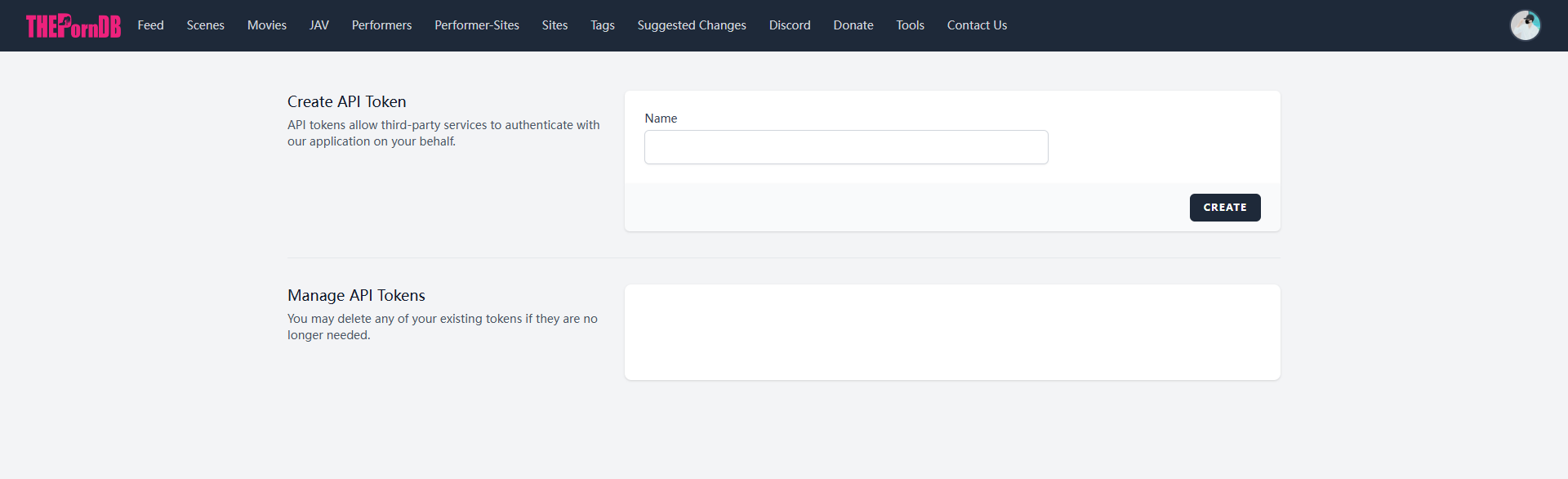
After registration, log in to your account and obtain an API key:
- API Key Acquisition Address: https://theporndb.net/user/api-tokens
Stash-Box
Stash-Box is the metadata management component of the Stash project, providing standardized metadata storage and retrieval services:
Official Instances
Visit the Stash-Box official documentation to view supported public instances:
On this page, you can see public sites supported by Stash-Box, including ThePornDB. You can also deploy private Stash-Box instances according to the official documentation.
ThePornDB also supports use as a Stash-Box client, providing richer metadata retrieval capabilities.

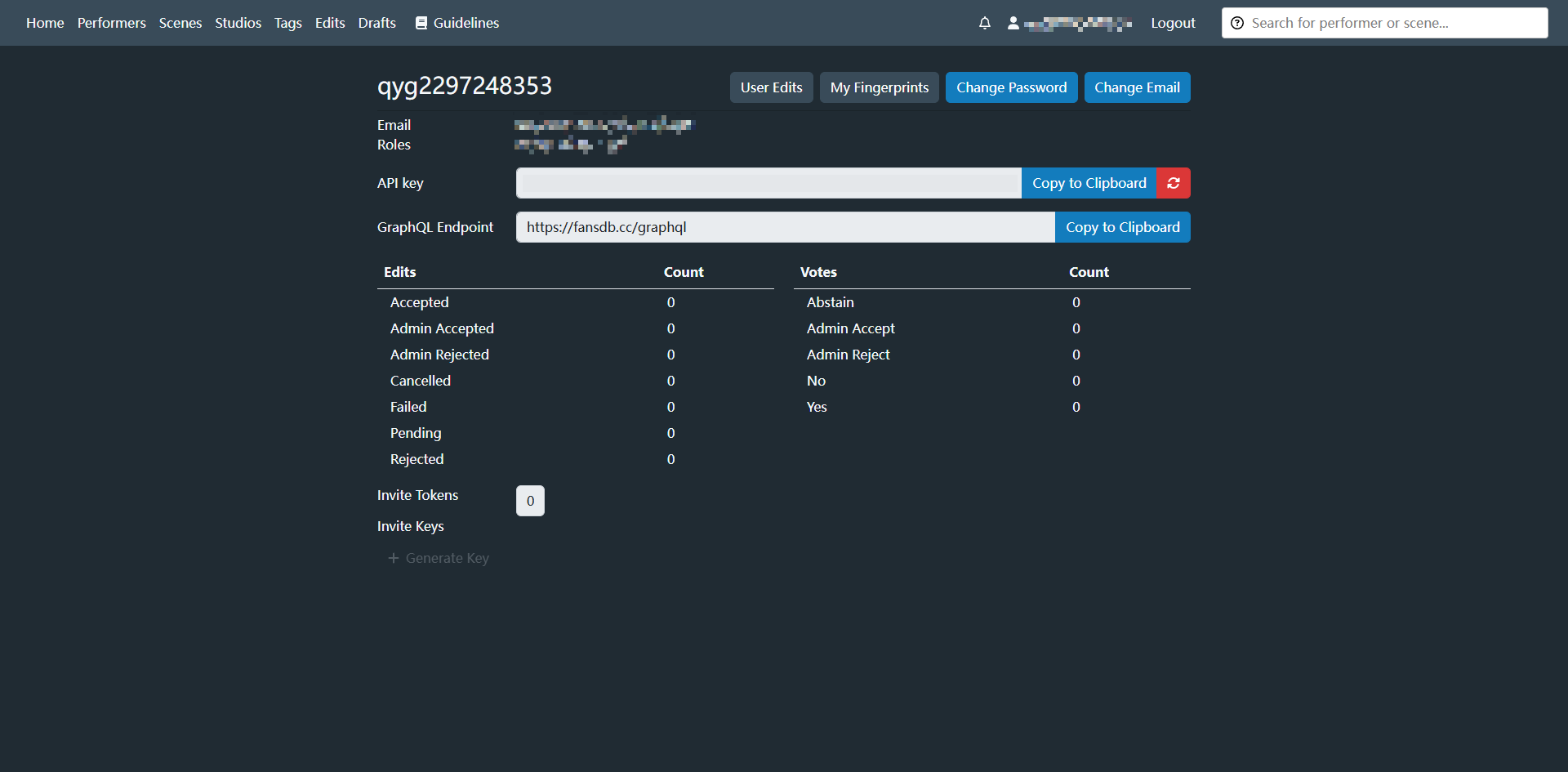
API Key Acquisition
Log in to the selected Stash-Box instance, generate and obtain an API key in user settings for subsequent client configuration.
Configuration Information
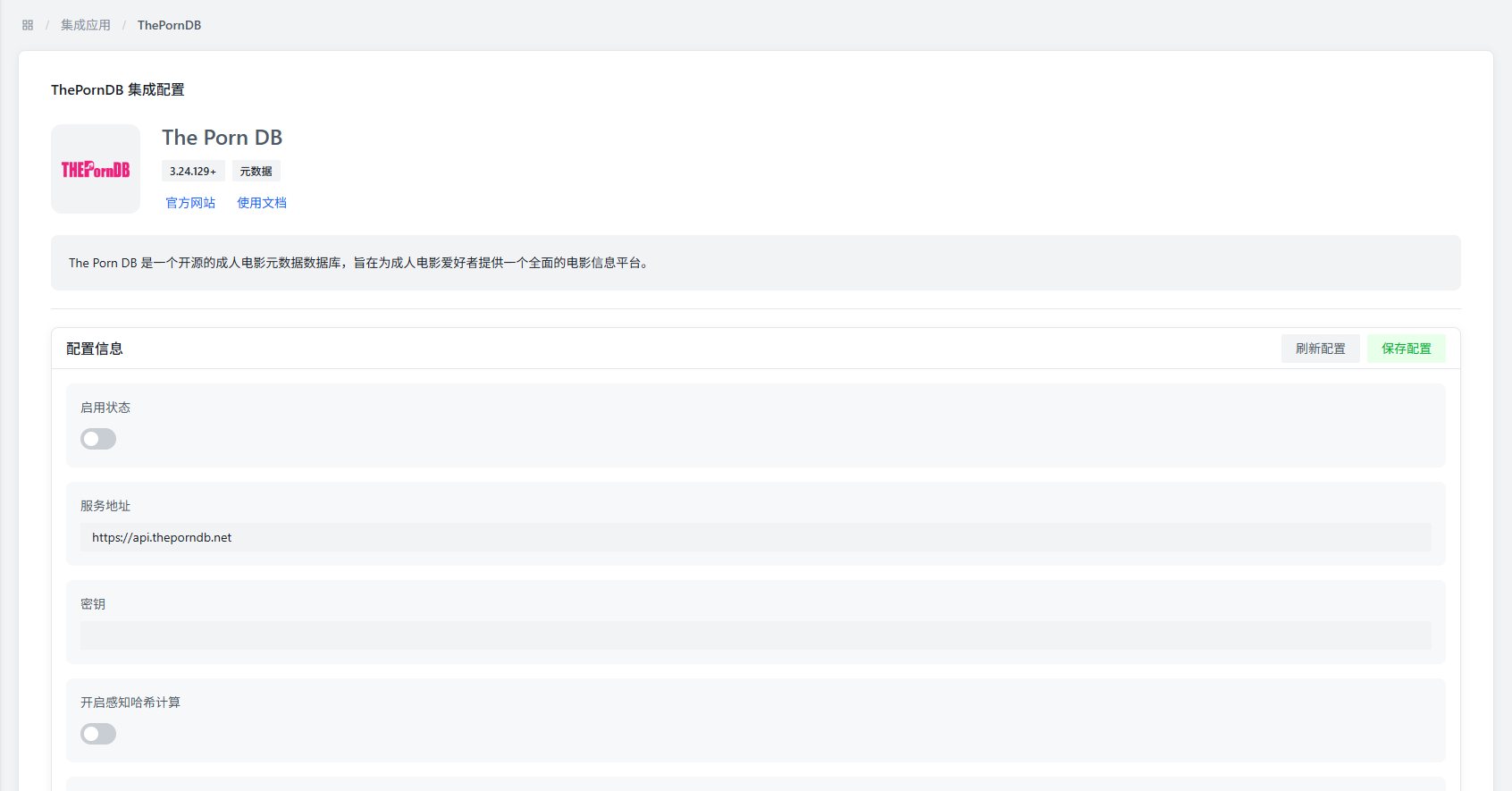
In the AMMDS management interface, access the configuration page through "Integrated Applications" → "Metadata" → "ThePornDB".

Basic Configuration Parameters
| Parameter | Description | Default Value | Recommendation |
|---|---|---|---|
| Startup Status | Controls whether to enable ThePornDB plugin | Disabled | Enable according to actual needs |
| Service Address | The access address of ThePornDB service | https://theporndb.net | Official address is stable and reliable, no need to modify |
| API Key | ThePornDB API key for service authentication | - | Enter the API key obtained from the official site |

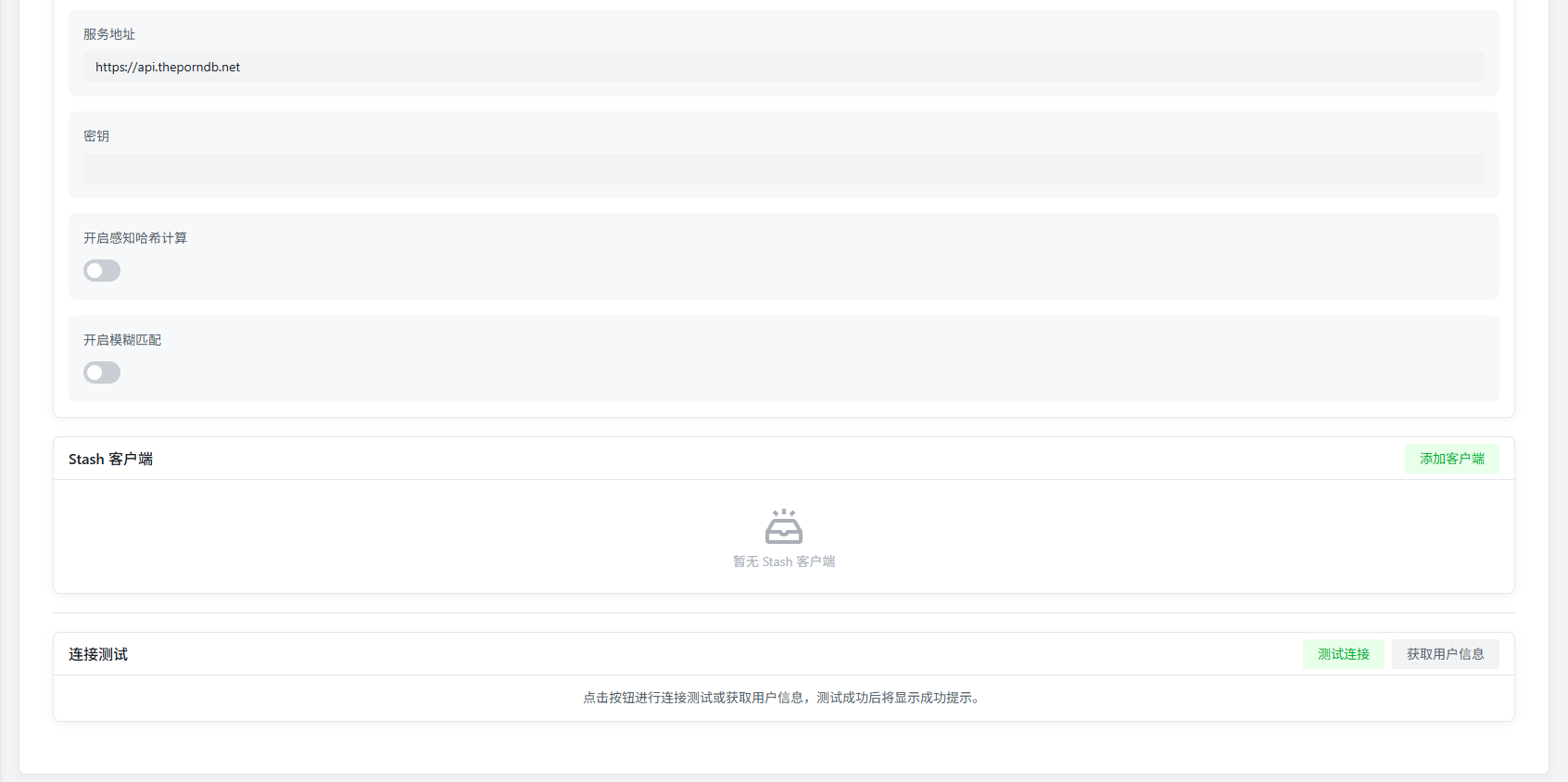
Advanced Configuration Parameters
| Parameter | Description | Default Value | Recommendation |
|---|---|---|---|
| Perceptual Hash Calculation | Whether to enable video perceptual hash calculation | Enabled | Depends on original video files, recommended to disable for non-standard video files |
| Fuzzy Matching | Whether to perform fuzzy matching by file name | Disabled | Recommended to enable when perceptual hash calculation is disabled |
- Perceptual hash calculation can improve recognition accuracy but increases system resource consumption
- Fuzzy matching is suitable for scenarios with standardized file names but special video files
Stash Client
By configuring Stash-Box clients, you can obtain richer metadata information:
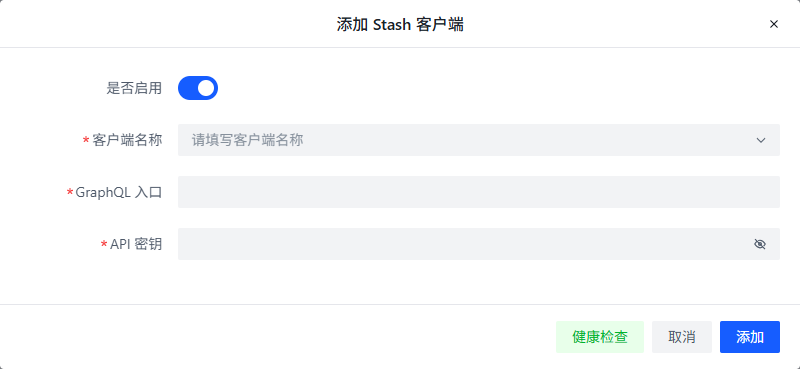
Add Client
Click the "Add Client" button to enter the Stash-Box client configuration interface:

Configuration Parameters
| Parameter | Description | Configuration Recommendation |
|---|---|---|
| Enabled | Controls whether this Stash-Box client is active | Enable according to actual needs |
| Client Name | Custom client identification name | Recommended to use site name for easy identification |
| GraphQL Address | API access address of the Stash-Box site | Select from dropdown or manually enter complete URL |
| API Key | Access key for the Stash-Box site | Enter the API key obtained from the corresponding site |
Configuration Method
- Select Preset Site: Select an officially preset Stash-Box site from the client name dropdown list, and the system will automatically fill in the GraphQL address
- Manual Configuration: To add a custom Stash-Box instance, manually enter the following information:
- GraphQL Address: Usually in the format
https://{site}/graphql - API Key: Generated in user settings of the corresponding Stash-Box site
- GraphQL Address: Usually in the format
- It is recommended to add multiple Stash-Box clients to obtain more comprehensive metadata
- Priority order affects metadata retrieval order, which can be adjusted according to needs
Test Module
The test module provides the following functions to verify plugin configuration and service status:
Test Functions
| Function | Description | Purpose |
|---|---|---|
| Test Connection | Verifies network connectivity to the ThePornDB service address | Confirms network connection is normal and service address is reachable |
| Get User Information | Attempts to retrieve and display ThePornDB account information | Verifies if API key is correct and service authorization is successful |
Usage Recommendations
- Pre-configuration Test: Before saving the configuration, it is recommended to test the connection status to ensure the service address is correct
- API Key Verification: Verify the validity of the API key through the Get User Information function
- Troubleshooting: When metadata retrieval fails, the test functions can be used to quickly locate problems
- Test Connection only verifies network connectivity, not service status
- Get User Information requires a valid API key and network connection
Common Issues
Service Connection Failure
Possible Causes:
- Network connection issues
- Incorrect service address configuration
- Invalid API key
Solutions:
- Check if the network connection is normal
- Verify if the service address format is correct
- Confirm if the API key has expired or is incorrect
- Try using the official default service address
Metadata Retrieval Failure
Possible Causes:
- Non-standard video file naming
- Perceptual hash calculation failure
- Data source site temporarily unavailable
Solutions:
- Enable fuzzy matching functionality
- Check if the video file format is supported
- Try replacing the Stash-Box client
- Retry the retrieval operation later
Stash-Box Client Configuration Error
Possible Causes:
- Incorrect GraphQL address format
- Insufficient API key permissions
- Site access restrictions
Solutions:
- Verify if the GraphQL address contains the complete path
- Ensure the API key has sufficient permissions
- Check if the network environment supports accessing the site
- Try using other Stash-Box instances
Performance Issues
Possible Causes:
- Perceptual hash calculation consuming system resources
- Multiple clients requesting simultaneously
- High network latency
Solutions:
- For performance-limited devices, consider disabling perceptual hash calculation
- Reasonably configure client priorities to avoid simultaneous requests
- Select Stash-Box instances with lower network latency
- Regularly update API keys to ensure security
- Only add necessary Stash-Box clients to avoid resource waste
- Combine use of ThePornDB and Stash-Box to obtain more comprehensive metadata